Windows 7 etiketine sahip kayıtlar gösteriliyor. Tüm kayıtları göster

27 Mayıs 2014 Salı

Cobalt Strike #6: Windows 7 Üzerinde İşletim Sistemi Zafiyetini Kullanarak Hak Yükseltme Saldırısı Gerçekleştirme

Cobalt Strike #6: Windows 7 Üzerinde İşletim Sistemi Zafiyetini Kullanarak Hak Yükseltme Saldırısı Gerçekleştirme

Bu yazıda Windows 7 32 bit işletim sistemine standart bir kullanıcı haklarıyla açılan Meterpreter oturumu kullanılarak, işletim sistemi zafiyeti (Windows EPATHOBJ::pprFlattenRec Local Privilege Escalation) istismar edilerek, SYSTEM yetkisiyle  yeni bir Meterpreter oturumu açılacaktır.


Senaryo 5 adımdan oluşacaktır:
  1. Mevcut durum incelenecek ve "deneme" adlı yerel kullanıcı hesabına ait haklarla çok da fazla bir işlem yapılamadığı görülecektir.
  2. MSF üzerindeki exploit modülü kullanılarak hak yükseltme işlemi gerçekleştirilmeye çalışılacaktır.
  3. Exploit kodu yeniden derlenerek hak yükseltme amaçlı kullanılacak bir uygulama oluşturulacak ve Meterpreter oturumu açmak üzere yeni bir uygulama hazırlanacaktır.
  4. Hazırlanan 2 uygulama kurban bilgisayarına ait disk sistemine yüklenecektir.
  5. Disk sistemindeki 2 uygulama çalıştırılarak yüksek haklara sahip bir Meterpreter bağlantısı oluşturulacaktır.


1) Mevcut Durumun İncelenmesi


Bu senaryoda; "deneme" adlı standart bir kullanıcı, Windows 7 bilgisayarda Windows oturumu açmıştır. Bir şekilde (sosyal mühendislik vs) bu kullanıcının haklarıyla Meterpreter oturumu açılmıştır:


Ele geçirilen bu bilgisayarın Windows komut satırına düşülür:


Ele geçirilen kullanıcı haklarının bilgisayar üzerinde çok da fazla bir yetkisi olmadığı görülmektedir:


2) MSF Modülü İle Hak Yükseltme İşleminin Gerçekleştirilmesi


Windows 7 bilgisayarda tespit edilen zafiyeti sömüren exploit/windows/local/ppr_flatten_rec modülüne ait exploit kodu bulunur ve bilgisayarın üzerine sürüklenerek, ayarlamaların otomatik olarak yapılması sağlanır:


Modül çalıştırıldığında gerekli ayarlamaların otomatik olarak gerçekleştirildiği açılan sekmede görülmektedir:


Ancak bu modül bazı durumlarda çalışamayabilmektedir.

3) Exploit Koduna Ait Uygulamanın ve Meterpreter Bağlantısı Oluşturacak Uygulamanın Hazırlanması

MSF modülünün çalışmadığı durumda modüle ait kod internetten bulunmalıdır:


Bu kod manuel olarak derlenmeli, gerekli değişiklikler yapılıp kaydedilir:


Hak yükseltme işleminden sonra yeni bir Meterpreter oturumunun SYSTEM hakları ile açılması sağlanabilir. Bunun gerçekleştirmek için bir Windows Uygulaması oluşturulabilir:


Bu uygulamanın Meterpreter Reverse HTTPS bağlantısı oluşturması istenir.


Bir dizine kaydedilir:


Böylece, kayıt işlemi gerçekleşmiş olur:


Not: Oluşturulan uygulama bir çok AV tarafından tespit edilmektedir. Bu sebeple, AV'lere yakalanmayan bir uygulama oluşturulmalıdır. Ayrıntılı bilgi için bakınız.


4) Kurban Bilgisayarına İki Uygulamanın Yüklenmesi

Sonraki işlem olarak derlenen exploit koduna ait uygulama (HakYukseltme.exe) ve yeni bir Meterpreter bağlantısını oluşturacak uygulama (TersBaglantiYapanUygulama.exe), kurban bilgisayarına yüklenir.
Bu amaçla kurban sistemin diskine erişilir:


İki uygulama dosyasınn yüklenmesine başlanır:


İki uygulama seçilir ve yüklenir:


Böylece, kurban disk sistemine dosyalar yüklenmiş olur.


5) Yüksek Haklara Sahip Yeni (2.) Meterpreter Bağlantısının Oluşturulması


Açık olan Meterpreter oturumuna ait bir Windows komut satırı (cmd) açılır (Önceden açık olan komut satırı da kullanılabilirdi):


Bu komut satırında hak yükseltme işlemi gerçekleştirilir. <HakYukseltme.exe TersBaglantiYapanUygulama.exe> komutu çalıştırılarak, deneme kullanıcısının önce SYSTEM hakları alması sağlanır, sonra da bu haklarla Meterpreter bağlantısını gerçekleştiren uygulamayı çalıştırması sağlanır.
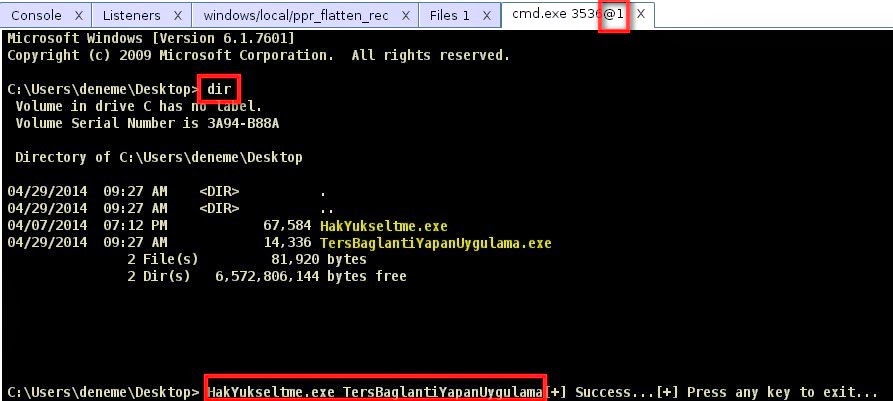

Böylece SYSTEM haklarıyla yeni bir Meterpreter oturumu ("Meterpreter 2") elde edilmiştir:


2. Meterpreter oturumunda SYSTEM haklarıyla Windows komut satırına (cmd) düşülür:


Bilgisayar üzerinde yetkiler görülebilir:


25 Ocak 2014 Cumartesi

MCITP Sınavı 70-680: Windows 7 / Part 3

MCITP Sınavı 70-680: Windows 7

Part 3: Configuring Hardware and Applications

1 Virtual Hard disks

Açıklama:
In this video I will look at virtual hard disks in windows 7. A virtual hard disk is a hard disk that is stored in a single vhd file. The vhd file can be used in virtualization software, mounted under windows explorer or if you are using enterprise edition or above even booted from.

Video:

Notlar:
Eklenecektir

2 Configuring devices drivers

Açıklama:
This video looks at how to configure device drivers in windows 7. This includes how to use the device manager, update device drivers and disable device drivers. Also this video looks at device driver signing

Video:

Notlar:
Eklenecektir

3 Troubleshooting devices drivers

Açıklama:
This video looks a number of different device drivers troubleshooting tools included with windows 7. These include pnputil, dxdiag, msinfo driver verification and driver query. These tools allow you to troubleshoot device drivers on your system as well as provide information about your device drivers.

Video:

Notlar:
Eklenecektir

4 Configuring USB

Açıklama:
Universal Serial Bus (USB) in windows 7 is an important technology to understand. It allows you to connect up devices like mice, keyboards, hard disks and printers. This video helps you understand how USB works and also looks at how to configure USB using group policy.

Video:

Notlar:
Eklenecektir

5 Application Compatibility

Açıklama:
This video looks at the technology in windows 7 that allows old applications to run in windows 7. Hopefully you won’t have to make any changes or set any options to get your old software to run. If you encounter problems running legacy software this video look at some of the option you can set in windows 7 to get your legacy software to run correctly.

Video:

Notlar:
Eklenecektir

6 Application Compatibly Toolkit

Açıklama:
This video look at the Application Compatibility Toolkit or ACT. ACT is a collection of tools which help you run your legacy applications on windows 7 in an enterprise environment.

Video:

Notlar:
Eklenecektir

7 XP Mode

Açıklama:
This video looks at XP mode. XP Mode is a new technology included in windows 7 which allows you to run your legacy applications in a virtual machine.

Video:

Notlar:
Eklenecektir

8 Application restrictions

Açıklama:
This video looks at the group policy settings that you can use to control which application your end users can use. Application restrictions dates back to windows XP so using them give you a lot of compatibility with older operating system if you are running windows in a mixed environment.

Video:

Notlar:
Eklenecektir

9 App Locker

Açıklama:
This video looks at AppLocker. AppLocker is a new feature in Windows 7 that allows you to control which software your end users can run. AppLocker includes some new features that allow an administrator to allow or block software based on the version of the software. Before there was no way you could block or allow a new version of software without creating a new rule.

Video:

Notlar:
Eklenecektir

10 Internet Explorer

Açıklama:
This video looks at the new features in internet explorer 8 bundled with windows 7. Topics include accelerators, in private browsing and zones.


Video:

Notlar:
Eklenecektir.


Kaynak:
http://itfreetraining.com/70-680/windows-7/

MCITP Sınavı 70-680: Windows 7 / Part 2

MCITP Sınavı 70-680: Windows 7

Part 2: Deploying Windows

1 Customizing Windows 7

Açıklama:
In this video I look at creating an answer file for Windows 7. Microsoft supplies the Windows Automation Installation Kit to help your automated the install of Windows 7. This video will look at how you can use the Windows System Image Manager supplied with the Windows Automation Installation Kit to create and customize answer files for Windows 7.

Video:

Notlar:
Eklenecektir.

2 Creating A Reference Image

Açıklama:
In this video I will look at how to create a reference image from an existing Windows 7 install. Creating a reference image allows you to configure one Windows 7 computer the way you want and then copy these changes to other Windows 7 computers on the network.

Video:

Notlar:
Eklenecektir.

3 Performing Maintenance On A Image

Açıklama:
In this video I will look at performing maintenance on a WIM image. This includes adding software in the form of CAB, MSU files and adding drivers to the image. Keeping an image up to date will increase the life of that image and means less work you need to performing when deploying the image to a new computer.

Video:


Notlar:
Eklenecektir.

4 Deploying a WIM Image

Açıklama:
In this video I will be looking at how to deploy a WIM image to a hard disk. The process is performed using windows PE. This video looks at how to perform this from the command line and also gives you some scripts to help automated the process.

Video:

Notlar:
Eklenecektir.

5 MDT 2010

Açıklama:
In this video I will look at automating the deployment of windows 7 using the Microsoft Deployment Toolkit. Using the tool kit you can make it easier to manage images on your network as well as keep them up to date.

Video:

Notlar:
Eklenecektir.

Kaynak:
http://itfreetraining.com/70-680/windows-7/

MCITP Sınavı 70-680: Windows 7 / Part 1

MCITP Sınavı 70-680: Windows 7

Part 1: Installing, Upgrading, and Migrating to Windows 7

1 Windows 7 Editions

Açıklama:
Before you start rolling out Windows 7 you need to have an understanding of the different editions and system requirements of Windows 7. In this video you will learn the 6 different editions that Windows 7 comes in and also the system requirements for Windows 7.

Video:


Notlar:
Eklenecektir.

2 Clean install Of Windows 7

Açıklama:
You have your hardware ready, you know what edition you want, now it time to install windows 7. This video will take you through how to perform a clean install of windows 7 on an empty hard disk.

Video:


Notlar:
Eklenecektir.

3 Install methods and dual booting

Açıklama:
There are a number of different ways in which to install windows 7. This video will take you though some of the different ways of installing windows 7 and also dual booting windows 7. Dual booting is when you run more than one operating system on the same physical computer.

Video:

Notlar:
Eklenecektir.

4 Upgrading to Windows 7

Açıklama:
If you are running Windows Vista you may want to upgrade to Windows 7 rather then performing a clean install. By doing this you keep all your settings and you won’t need to reinstall your software. This video looks at which upgrade paths are available from Windows Vista to Windows 7. Microsoft also supplies an upgrade advisor which can alert you to potential software and hardware problems before upgrading to Windows 7.

Video:


Notlar:
Eklenecektir.

5 Installing Windows 7 from the network

Açıklama:
In this video I look at installing windows 7 from the network. This can be achieved in two different ways. Firstly by booting windows PE and the other method by using a deployment system like Windows Deployment Services.

Video:

Notlar:
Eklenecektir.

6 Migrating to Windows 7

Açıklama:
If you want to upgrade from an operating system that does support an in place upgrade like windows XP or certain combinations of Windows Vista to Windows 7, your only choice may be a migration. A migration allows you to capture your settings and documents and transfer them to anther install. You will need to reinstall all of your software but performing a migration is sometimes the only choice.

Video:

Notlar:
Eklenecektir.

Kaynak:
http://itfreetraining.com/70-680/windows-7/

26 Ekim 2012 Cuma

İpucu: WCE'den Kaçınma Yöntemi

WCE'den Kaçınma Yöntemi
Ön Araştırma
Microsoft'a göre bilgisayarlarda, LM saklanmaması için yapılacak 4 temel yöntem varmış:
  • Network security: Do not store LAN Manager hash value on next password change --> Enable olmalı.
  • Network security: LAN Manager authentication level --> Send NTLMv2 response only\refuse LM & NTLM olmalı.
  • HKEY_LOCAL_MACHINE\SYSTEM\CurrentControlSet\Control\Lsa\NoLMHash --> 1 olmalı.
  • Parola uzunluğu 14 karakterden daha uzun olmalı.
Kaynak site:
http://support.microsoft.com/kb/299656

Kıssa
Bir bilgisayarda (W7 Enterprise, SP1) bu ayarlamalar yapıldı:
Daha sonra aşağıdaki 3 senaryo denendi:
  • Parola uzunluğu 9 karakter olarak ayarlandı. WCE ile bu parola (Deneme123) açık olarak elde edilebildi:

  • Parola uzunluğu 19 karakter olarak ayarlandı. WCE ile bu parola (Deneme123Deneme123!) açık olarak elde edilebildi:
  • Parola uzunluğu 10 karakter (14 veya daha kısa) olarak ayarlandı. Parola oluşturulurken ALT tuşu ile kombinasyon oluşturulacak şekilde karakter de kullanıldı. WCE ile bu parola (Deneme123€) açık olarak elde edilemedi:
Kaynak site:
http://computer-forensics.sans.org/blog/2012/02/29/protecting-privileged-domain-accounts-lm-hashes-the-good-the-bad-and-the-ugly

Mimikatz
Aynı parola mimikatz ile kısmen yakalanabilmektedir:

Not: Eğer Windows komut satırı aracının font'u Lucida Console olarak ayarlanırsa, özel karakterler de düzgün olarak görüntülenebilir.

Hisse
WCE tarafından yakalanmamak için, ALT tuşu ile kombinasyon oluşturan parolalar kullanılmalıdır. Mimikatz tarafından yakalanmamak için ALT tuşu ile kombinasyon oluşturan farklı karakterler kullanılabilir. Bu karakterlerden bazıları şunlardır: '£', '%', '¨¨', '', 'æ', 'ß', '´´'

ALT tuşu ile kombinasyon oluşturan sayı listesi aşağıdaki gibidir:
http://tlt.its.psu.edu/suggestions/international/accents/codealt.html

ALT tuşu ile kombinasyon oluşturan sayıların kullanımı aşağıdaki gibidir:
http://www.youtube.com/watch?v=5SPlCJ3rwME

8 Ekim 2012 Pazartesi

Pentest Senaryoları

Senaryolar

Deneme Ortamı: Free Metasploit Penetration Testing Lab In The Cloud
Kaynak site:
https://community.rapid7.com/community/metasploit/blog/2013/01/08/free-metasploit-penetration-testing-lab-in-the-cloud

Create Exploit Using Msfvenom to Hack Windows 7 SP1
Kaynak site:
http://vishnuvalentino.com/hacking-tutorial/create-exploit-using-msfvenom-to-hack-windows-7-sp1/

5 Ways to Find Systems Running Domain Admin Processes
Kaynak site:
http://www.netspi.com/blog/2012/07/09/5-ways-to-find-systems-running-domain-admin-processes/

Dumping Clear Text Passwords
Kaynak site:
http://e-spohn.com/blog/2012/07/06/dumping-clear-text-passwords/

Yapışkan Tuşlar ile Komut Satırına Geçme
Kaynak site:
http://ertugrulbasaranoglu.blogspot.com/2012/10/ipucu-kapal-oturumda-yapskan-tuslar-ile.html

Bypass Windows Logons with the Utilman.exe Trick
Kaynak site:
http://www.technibble.com/bypass-windows-logons-utilman/
http://www.youtube.com/watch?feature=endscreen&v=di3BIqq40bE&NR=1

Winlockpwn: More then a Partytrick
Kaynak site:
http://www.spylogic.net/2008/05/winlockpwn-more-then-a-partytrick/
http://www.youtube.com/watch?v=jbOioD8LU5Y

Inception
Kaynak site:
http://www.breaknenter.org/projects/inception/

BeeF + Social-Engineering + Metasploit
Kaynak site:
https://www.youtube.com/watch?feature=player_embedded&v=EPJWsElU0fs

Owning Windows Networks with Responder 1.7
Kaynak site:
http://blog.spiderlabs.com/2013/01/owning-windows-networks-with-responder-17.html

Finding Admin Access
Kaynak site:
http://www.room362.com/blog/2012/10/30/finding-admin-access.html

Hack netNTLM Credential using Microsoft Word UNC Path Injector
Kaynak site:
http://www.hackingarticles.in/hack-netntlm-credential-using-microsoft-word-unc-path-injector/

Metasploit ile Oracle Veritabanlarına Yönelik Temel Sızma Testleri
Kaynak site:
http://www.agguvenligi.net/2013/07/metasploit-ile-oracle-pentest.html